Picture yourself in the metro or on a bus, facing a long trip home and wondering what to do: You're tired of tweeting; you're not up to a Snapchat; and your temporary transit neighbor has his earphones plugged in. What's more, nothing outside your window seems likely to hold your attention. So, what now?
The answer is three mind-blowing apps that will not only help you kill time but help you boost your productivity and skills. So, grow up, uninstall those teenage-style car-chase games and check out these apps right away.

Elevate

If you're looking for brain-improvement games that help you improve your cognitive and comprehension skills, communication skills, math skills, processing speed, focus and memory, Elevate is just the app for you.
It was designed with assistance from neuroscience experts who had conducted extensive scientific research on cognitive learning. Elevate's brain-training algorithms train your brain to focus and learn, based on your personal abilities, so you personalize your training program and can set the pace of training. People using this app more than three times a week have reported a boost in skills and confidence.
Elevate has more than 30 games that improve all-round skills. Detailed performance analysis allows you to see how well you are faring in the different challenges presented; and a calendar helps you commit to this unique brain workout. The app also integrates with Apple Watch, so you can track your performance even there.

TimeDrop

TimeDrop is a color-matching game that teaches you a thing about science and evolution. If you are a Big Bang and evolution enthusiast, you probably already know all about water and rocks and time-travelling.
What's more, it's said that matching games comprise the building blocks of cognitive skill development. Many curriculums use color and shape-matching to impart skills for math, science, language and reading.According to educational consultant Ellen Booth Church, "When a child learns to discern the similarities and differences between colors and shapes, [he or she] uses the same skills to recognize the differences between letters and numerals." This is cognitive skill development.
Cognitive skill development can help you evaluate, establish, arrange and channel your focus and attention. It's a skill set that can further help you in life by improving your ability to analyze and comprehend real-life situations. For instance, in real life we are perennially swimming in a sea of knowledge, but how do we cut through the clutter and connect the dots?
Cognitive skills acquired through color-matching games improve the brain's ability to "connect the dots." Improved cognitive skills further advance productivity. So, this game will be your perfect companion when you're looking for short respites from work or the boredom of a long trip. TimeDrop is also definitely addictive, thanks to the burst of vibrant colors and the reward of free coins you get from time to time!
Rounds
When you grow bored of playing games and solving math puzzles, tryRounds. Rounds is a video-chatting app that allows you to connect with friends and family through video conferencing.
It comes with funny chat-effects that make talking with friends really fun. But the most important part is it allows you to share and watch YouTube videos with friends and co-hobbyists who share similar passions.
For instance, if you are watching a fitness or recipe video over YouTube, along with people in your group who share similar interests, you all can exchange notes over videos and pick up a thing or two you might have missed.

The app has been downloaded over 350,000 times and has a 4.2 rating onGoogle Play. It is also available on iTunes.

Parting thoughts

Thought leaders can't stress enough how important it is to boost our skills and improve our productivity. Cognitive psychologists have claimed that working memory is the most important cognitive predictor of fluid intelligence. Of the three apps presented here, Elevate helps improve working memory and the other two can help improve skills development.
In a nutshell, these three apps are the next best thing after brain and skill-development courses. They're designed to help people effectively and systematically use technology to become ever more effective by improving their focus and skills. They do this by leveraging the most progressive mobile technology to channel cognitive science.
If technology has ever helped us to improve ourselves, it's through these apps. Seeking some real brain challenges and skills development? Try these apps now.
In Ultimate Guide to Local Business Marketing, Google AdWords expert Perry Marshall and lead generation expert Talor Zamir introduce you to the basic framework behind a successful local marketing campaign. In this edited excerpt, Perry and Zamir offer advice on running mobile ad campaigns on Google AdWords.  
It’s now impossible to go outdoors without seeing people with their heads buried in their mobile devices. At the store, at our kids’ soccer games, at a restaurant, and even in our cars, we’re addicted to our smart­phones. And your prospects are no different (in fact, many of those people you see buried in their phones are your prospects).
So it should come as no surprise to hear that mobile search has been skyrocketing year after year. Mobile search has become one of the biggest areas of profitability for Google, and it’s only going to continue to grow.
Here are just a few statistics that underscore the huge importance of mobile search in local markets:
  • According to a 2015 poll by BrightLocal, almost 40 percent of U.S. adult mobile phone users had searched for a local business on their phone at least once a month over the previous year.
  • Research from BIA/Kelsey estimated there would be 81.8 billion U.S. local search queries done via mobile in 2015. They estimate that by 2019 that number will be 141.9 billion!
  • As of mid-2015, the number of mobile searches now exceeds desk­top searches.
There are two key factors that make mobile so powerful for local businesses. One is that local businesses have an especially high percentage of prospects searching for them on mobile devices. The other is that, for most local businesses, you’re trying to generate a phone call, so having a prospect already on their smartphone makes placing a call even easier. All it takes is one click, and they can instantly call you.
This makes it critical to make sure you have “click to call” enabled on the phone numbers on your landing pages. You also want to make sure your landing page is mobile responsive, so when prospects look at your landing page, it’s mobile friendly and they can easily read the copy and see all the benefits. Then they just need to tap your phone number to place a call to you. Having this in place will lead to higher conversion rates.
Mobile leads can also be higher-quality leads, depending on the niche. One prime example is someone who was just in an accident and does a Google search on their phone for a car accident lawyer. That’s someone who is going to be a very hot, very motivated lead. That’s true in a number of niches, and we often find that high-quality leads come from mobile. If someone is searching specifically for a local business from their mobile device, they’re probably not just browsing. People tend to browse a lot more from their computer than from a mobile device.

Mobile ad positioning

Typically the best “bang for your buck” for ad positioning is around 2.5. In that position, you’re usually showing up in one of the top three spots, yet you’re not overpaying for your clicks just to be number one.
However, things are a bit different for mobile. Whereas with desktop searches there will usually be three ads above the organic search results, in mobile, there will only be one or two. Because of this, it’s very important to watch your mobile stats and make sure that your average position for mobile is two or preferably higher.
You don’t want to be at position number three on mobile, because it means you’re probably dropping to the very bottom of the page or possibly page two. And that means you’re going to get a lot fewer impressions, a lower clickthrough rate, and miss out on a bunch of potential leads.
Mobile conversions are something you want to keep a close eye on, especially in the first week or two after launching a campaign. If you notice you’re getting really good leads from mobile, you may want to consider raising your bid higher to be number one and maximize things to capture even more leads from mobile.
Google used to give you the option of running mobile-only search campaigns in AdWords. Unfortunately, that’s not the case anymore. Instead, advertisers now have the option of adjusting their bids for mobile devices in their campaigns.
If you find mobile traffic isn’t converting well for you, it’s possible to decrease your mobile bids by 100 percent, which will effectively stop your ads from showing up in mobile searches. Or if mobile traffic is converting at a little higher cost per conversion than you’d like, decrease your mobile bids by 10 or 25 percent or whatever percentage you think makes sense based on the data. If mobile traffic is converting well, you can increase your bids for mobile anywhere from 1 percent to 300 percent to improve your mobile ad positioning.

Creating mobile optimized ads

In AdWords, you have the ability to create mobile-optimized ads. It’s very easy to do. When you are creating a new ad, there’s a checkbox for “Device preference” where your only option is “Mobile.” Checking this box doesn’t guarantee the ad will only run on mobile devices, but they are given “preference” on mobile devices.
It’s not mandatory to do this and set up separate ads for desktop vs. mobile traffic. However, there are a few benefits to doing this.
First, it can help you better split-test your ads because, in each ad group, you can create two mobile ads that you can split-test against each other and two desktop ads that you can split-test against each other. Even more important is that you can better customize your ad copy for mobile devices. For instance, it’s good practice to emphasize the words “Call Now” in your mobile ads because you really want people to call you rather than click through to your website.
Make sure you give mobile traffic the proper amount of attention it deserves in your campaigns. It may just turn out to be the most profitable source of traffic you can get!
You have been thinking about this great idea on Big Data. You are convinced in your heart of hearts that this is indeed what the world needs. Why, you think, isn’t the timing just right? Big Data is no more in hype cycle; it is clearly now mainstream.Everyone is collecting so much data that they are literally drowning in their data lakes, and worse, they are not able to take advantage of this incredible asset they have.
Surely in such a situation, you think, your idea may be just what the world is waiting for.
But wait. Before you quit your cushy job and plunge full time into startup mode, stop for a moment, ponder on the following and, once you have figured it out, go ahead. The world is indeed waiting for your startup to take shape.
Be very careful of these pitfalls.
Every venture carries some risk and a Big Data startup is no different. However, there are some specific challenges in this emerging field which need good understanding. You need to know what you are getting into and you need a plan to avoid the pitfalls.
Difficult to find good people? Develop them.
While it is true for all the industries, there is a big shortage of Data Scientists, let alone good Data Scientists. And to compound that, there is not even a consensus on what defines a Data Scientist.
Should they be proficient in Mathematics/Statistics or should they know more of R and SQL? Should they have a deep domain knowledge or should they possess business analysis skills? Do you need a skillful data modeler or a master story teller? An artist with scientific training or a Scientist with an artistic streak?
As you guessed correctly, the right answer isa mix of all these. Keep looking for that perfect person, but in the meantime hire people, even people fresh out of college, with right attitude and then train them to acquire the right skills.
Do not hard sell your algorithm, tell what it will do for the client
Remember, each client will be at a different stage of the Big Data journey. While some may be in advanced stages of this journey, others may have just started it. You can talk about how powerful and efficient your algorithm isbut, what will really click is what the client can do with your algorithm. A story based on a practical application is any day better than the mathematical formulas or the pseudo code of the algorithm.
Therefore, put on your hat of consultative sales; work with the client to understand their pain points and help them articulate their problem statements. And then focus on the use-cases.
Difficult to calculate ROI? Build the business case with the client.
Big Data has not attained that level of maturity that enterprises can easily calculate the ROI. In some way, it is where eCommerce or Cloud Infrastructure were in their nascent years. In general, the CxO’s know the benefits that will result from Big Data initiatives but it is difficult to quantify these benefits and hence,they not able to decide how much to invest in a Big Data initiative.
The best way to deal with this issue it is to help build compelling business cases. Define the benefits,for example, 3 per cent savings due to optimized inventory,accurate forecasting will reduce wastage by 5 per cent, prompt attention to customer complaints within 24 hours leads to reduction in customer churn by 3 per cent. In each case, ascribe numbers and monetary figures. It may not be perfect, but it still is a good start.
Data is everywhere and nowhere- triangulate within company and from outside
Everyone collects data and will collect more and more of it. However, the data models, applications, storage and archival practices have evolved over the years. Some data was collected for regulatory compliance, some because the ERP systems had a mandatory field in a transaction and perhaps, most of it was collected because the application were designed so. In modern days, every merger and acquisition, every new market or product line and every joint venture or partnership is making the data more and more complex.
The data scape is therefore not pristine but a rocky and rough terrain with gaps, inconsistencies, and many imperfections arising out of evolution of application and business landscape.
By default, such data does not lend itself easily for analysis. You may have to break down internal barriers, as well as triangulate this data with other external sources. Remember that the best way to find and collate the data is to focus on data discovery together with the client.
Data is private, the owners are supreme
Regulations pertaining to data security and data privacy are myriad and evolving. European Community is the frontrunner in this area and is drafting rules that more fiercely protect their citizens from data abuse. Privacy concerns make some part of the data scape unusable, and some parts become minefields. And you cannot circumvent these regulatory requirements, period!
On top of it, some of the data would be considered sensitive by the business users and hence restrictions will be imposed on its usage.
Work with the client to understand such restrictions and use techniques like anonymization, aggregation, masking, etc. to address these concerns.
So many problems?Should I do it or not?
Like I said earlier, every venture carries some risk and a Big Data startup is no different. However, the more you understand these risks, the better will be your risk mitigation strategies. And a thoughtful risk management plan is critical for evolution of a successful business.
One last word – analyze these challenges and have a plan to deal with them. But, do not let these problems deter you. Go ahead and make that leap of faith. After all, the world has been waiting for your idea for so long!
Digital marketers keep on looking out for new trends emerging every year to tap into the vast unexplored market. If we look at a potential customer, he/she is networking into an array of social channels, through multiple devices and platforms in one or the other way. Businesses try hard to engage and grow consumers through these mediums. Here are a few social media trends expected to make impact this calendar year.
Snapchat:
This app has taken the world by storm, and is a powerful social networking channel for businesses looking to engage the millennial generation. The digitally savvy audience has already started sharing pictures, videos and other media with this app.
The selling point of application for businesses would be the feature where it provides an expiration date to the content you post, which the audience are attracted towards. Such types of custom content, which run only for a defined period of time in the form of teasers, trailers about upcoming products, would surely attract target audience.
Instagram:
The digital society we live in today thrives on visual stimulation, and Instagram provides just that medium to share your thoughts and experiences in the form of images/videos. In fact, this year businesses would re-think their strategy and go this way. To woo more advertisements, Instagram has increased their video advertisement time limit to 30 seconds in 2016.
Pinterest:
We all know what an exciting medium Pinterest is, and while we have just begun to get familiar with buyable pins, it has been publicized that Pinterest is introducing a new feature – ‘Animated Cinematic’ pin. It would allow brands to target a specific person based on his/her interest.
Businesses should start thinking about how they can incorporate these trends into their digital marketing strategies to have a higher probability of success. It is recommended that you perform a feasibility study before you start incorporating these trends in your organization, as you might not need all of them.
These are just some of the 2016 trends; stay connected for more updates in digital marketing, social media marketing and web designing trends in 2016


Google is the Proclaimed king among all search engines present on the internet. Among all the web based search engines, Google stands out because of its high speed and simplicity.

Everyone is familiar with the web applications provided by Google. Some of these are the Gmail, Google Drive, Google app store and a lot more. But little do people know about some very handy Google tricks that come along with this impeccable search engine.

 Top 10 Cool Google tricks of all times:


Below are Some Cool Google Tricks that i have Collected. Do not Forget to Check Bonus at the End of the Post. Enjoy !!!


1. Definition:


There is no longer the need to type a word and then visit dictionaries online to find its meaning. Using this trick, all you need to do is simply write “define” followed by the word whose meaning you want to know, This Cool Google tricks Come very handy if you use it Effectively.
You will be amazed to see that the meaning of the word, along with its synonym and antonym will be displayed on the search engine. For instance, type “define reach” and then press enter. The meaning of the word will get displayed on your screen.


2. Phone number lookup:


It is now possible to trace mobile number by simply typing the full number along with the area code. This will display the address as well as the name of the person under whose name the number is registered.(Doesn’t Work anymore)
This was the Most helpful thing i have seen from all the Google Tricks. Unfortunately its not working anymore. Check the below list.


3. Atari Breakout:


Only Few Know about this trick and so I think this is the Best Trick amongst all the Google Tricks. All you have to do is Type Images.google.com in the address bar of your browser to open up google images. Now type “Atari Breakout”  and Press Enter.
You will Definately Be amazed to see what happens next. It is Only Fair to Add this Trick in my list of Cool Google Tricks.
Note: I am not Responsible if you waste over an hour in playing this game. J/K


4.Translate:


The “Google language tool” comes very handy while translating text, words, a fully fledged web page or document on the internet.


5.Find movies and weather:


All you need to do is type “movies” or “weather” in the search box followed by the area code or name of the state in order to display corresponding information regarding it. For instance, if you type “weather 12345”, weather conditions of the corresponding location will be displayed.
Also, on typing “movies 12345”, the details of all the movies currently running at that place along with number of shows will get displayed. this is another Cool Google trick then i like and use.


6.Paged linked to you:


You can now find the web pages and links that are connected with your blog or website. Simply type “link” followed by the URL of your website and you will get a list of all the pages connected with your website.


7.Tracking airline flights and packages:


This is another handy Google trick. You can now find the arrival time and status of a flight by simply entering the name of the airline and corresponding flight number.


8.Calculator:


You can use the Google search engine as a real time calculator as well. For instance, if you will type 25+25 in the search box, 50 will get displayed.


9.Stocks:


All you need to do is type the stock symbol on Google and you will get information about stock rates, links as well as charts. For instance, to know about the stock details of “Microsoft”, you have to write “msft” on Google.


10.Finding PDF results only:


To get results matching only a certain file type, simply type “fileType:” after your search. Online manuals can be found using this trick from Google.


11.Local search:(Bonus 1)


You can now find local restaurants and other landmarks with this trick. One of the best Google tricks according to me. Simply go to “Google visit” and type the name of the area and the place which you want to find. It is capable of displaying all local landmarks and places.


12. Use Google as Timer (Bonus 2)


You Can use Google Search to Set Timers too. If you want to Complete Certain Task in so and so minutes or hours then You can simply start Timer. This is one of the Most amazing Google Tricks that very few people are aware of. All you have to do is Open a new tab in your favourite Browser and Enter the Term “Set timer 10 minutes” and click enter.
As soon as you Hit enter you will see google timer is already started.  In this Example i have used 10 minutes but you can always change it to anything.
For Eg: if you wish to set a Timer for 1 and half hour then you will enter thie term “Set Timer 90 Minutes” and Hit Enter.

With this it ends my list of Cool Google tricks, If i am Missing out on any Usefull Trick then please feel free to Comment.

Keep Visiting

With millions of computer users browsing the web at any given time, there are plenty of targets for malicious coders. While computer experts don’t always know why coders choose to build harmful computer programs, the fact is that it happens all the time. Computer viruses can steal personal information, interfere with normal operations, attract spam and even shut down your computer’s hard drive. Protecting your computer is critical for browsing success.

Start With the Basics


Most computer systems come with security features already in place. For example, the Windows operating system is packaged with Microsoft Windows Security Center. When you first open, boot up and register a new computer, you should make sure that this program is functioning. It will give basic protection against spyware, viruses and malware. In addition, a basic firewall is built into this program, providing additional protection and stops for potentially harmful programs. Upon activation, don’t be surprised if your security system needs immediate updating. Software that protects your computer needs regular and consistent updating to stay useful. Viruses are constantly being generated and the several-month lag between when your computer was made and when you first started using it can mean that the database the security system is loaded with is severely out-of-date.

Upgrade to Meet Your Needs


Many people operate computers for a long time with only basic protection in place. However, heavy computer users or those who have risky browsing habits can sometimes benefit from upgrading their virus, spyware and malware protection, as well as using a fuller-featured firewall; this is especially important if you use a networked computer system. Basic or free virus protection will still scan and update for viruses. Paid programs, however, offer more features, including ease-of-use and convenience features. The most important thing is to verify the publisher and make sure you are getting what is promised. Most well-known virus protection programs, such as AVG and Norton Security, have reviews available to help you make your choice. 

Learn About Spyware Risks

Spyware creates risks that many computer users are not aware of. If you are only protecting against viruses, you could be leaving your computer open to damage. Most people are familiar with spyware that initiates and attracts annoying ad programs. Spyware, however, can be much more malicious as well. Your shopping habits can be tracked by spyware. While not exactly harmful, some people consider this a breach of privacy. The worst spyware programs interfere with normal operations and can even track what you type, sending personal information to people who want to steal your identity. Some spyware redirects your browser to different web addresses, increasing your risks of virus infection and fraud.

How Viruses Work


The main difference between spyware and viruses is how they are spread. A virus reproduces itself and attaches to any document that the computer sends, while spyware can be stored as a cookie or tracking code. A virus is most often found traveling with a piece of computer software, such as a document, picture or piece of music. When dealing with email, it is necessary to open an attachment to become infected, indicating that, in most cases, the computer user must somehow invite the malicious software to replicate on their system. Of course, most people have no idea it is there or what is happening. Some of the sneakiest and most harmful viruses actually masquerade as virus protection software, making them extremely hard to detect. Because of this, it’s crucial to be familiar with your particular virus protection program and know what it looks like and what the normal scripts and prompts are during operation. Viruses do some of the same things that spyware does; they just accomplish it differently. An active virus can steal personal information, generate ads or shut down your system, including the very virus protection programs that can fix the issue.


Take Steps For Protection 

 Like anything, the best way to protect against viruses is to be educated. Become familiar with what malicious software may look like. If you get an email or are asked to download a file that you don’t recognize or looks suspicious, do your homework. Research virus protection, spyware, malware and firewall programs and use them to their fullest capacity. Set the software to update and scan automatically to make sure that the system is constantly monitored. In addition, regularly check on the databases published by various virus protection services; many will provide lists of symptoms and risks, as well as the standard way the file gains access for no cost to the public.

Keep visiting

1) Matrix Effect:

We Have Seen alot of times in movies some kind of numbers in Green Color Flashing really fast. Ever Wondered How they do it ? 

Well, Today you will learn it. Basically its a Small Batch file that helps to do it. Just follow the Below simple steps to do it yourself.

Step 1: Open Notepad.
Step 2:  Now Copy the Below Code.


Step 3: Paste the Code in Notepad and Save it by Clicking on File and then Save.
Step 4: You will be now asked the file name and Save as Type, So name the file as Matrix.bat andChoose All files in save as type.
Step 5: Remember the Destination where you save the file. Now Navigate to the Location where you saved this file. Double Click on it to See the Magic.
_________________________________________________________________________

2. Ghost Keyboard Typing:

This is a Technique by Which you can make Notepad type Automatically whatever you want. That means i will share a script which you will use to Display anything you want to and Notepad will automatically type it for you.
Step 1: Open Notepad
Step 2: Copy the Below code.


Step 3: Paste the Code in Notepad and Save it.
Step 4: Name it Trickslove.vbs and Choose All files in Save as type.
Step 5: Double Click on the saved file to See this Live Notepad Trick

______________________________________________________________________

3. Make your Computer Speak:

In the Above trick we made notepad Type automatically but now we will our own text to Speech tool with the help of small script in Notepad. You will make your Computer Speak whatever you type. Excited ? Then follow the Below Simple Steps.
Step 1: Open Notepad
Step 2: Copy and Paste the Below Code in Notepad.


Step 3: After Pasting the Above Code in Notepad, its time to Save the File. Save the File with name Speak.vbs and again choose All files in save as type

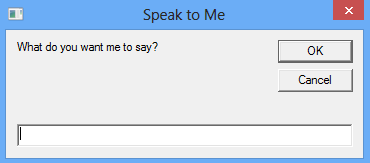
Step 4: Double Click on the File to See a pop up Window that looks something like this Picture

Now All you have to do is Type in Anything that you want it to Convert in Speech.

Then Click on Ok. Wait a second or Two and hear it do its work.

______________________________________________________________________

4. Keyboard LED lights Dancing Trick

This is another Fun Trick which will Make your Keyboard Lights ie: Numlock,Capslock and Scroll lock lights go dancing..

Step 1: Open notepad.

Step 2: Copy the Below Code and paste in it.


Step 3: Save the File with the name Led.vbs and again choose all files.

Step 4: Double click the File to open, Look down at your keyboard to See the live performance.

How to Stop:
To Stop it just follow the Below Simple Steps.
  • Open Task manager by Pressing CTRL+ALT+DELETE
  • Now Goto Process Tab
  • Scroll down and search for wscript.exe and End the Process.
______________________________________________________________________

5. 9/11 Attack.


Do you know that World Trade Center Attact can be Seen in Notepad? If you are not aware of this trick then here is how to do it.
Step 1: First of all you will Open new notepad file.
Step 2: Type in Q33N
Step 3: Click on Format > Font> and Select font as "Wingdings" now Increase the font size to 72
You will be Amazed to See What notepad Displays you.

So with this It Concludes the list of 5 Best Notepad Tricks. If you enjoyed it then please care to Share it on Social media using the Below Buttons.
Keep visiting
Next PostNewer Posts Previous PostOlder Posts Home